TL;DR
Between June 3 and August 17, 2026, Salesforce is converting four long-standing security recommendations into enforced platform behavior across every paid org, sandbox and production. Two further controls remain strongly recommended but are no longer mandatory. If you administer or architect a Salesforce org, particularly in a regulated industry, the practical impact lands during your normal summer change-freeze window. The May 6, 2026 admin email was not a marketing nudge. This post lays out the consolidated timeline in one table, an architect's view of each control, and a prioritized prep checklist.
This is the largest forced-change identity event Salesforce has executed since the original 2022 contractual MFA requirement. Per a quoted Salesforce security-team statement reported by Vantage Point, this is also the first time Salesforce has enforced a change outside its regular release schedule.
Why this is happening now
Salesforce's own Security team blog, published May 12, 2026, frames the change explicitly around three AI-amplified attack vectors:
- Account Takeover (ATO). AI-enhanced credential stuffing and phishing campaigns now operate at scale a single bad actor could not previously achieve. Complex passwords no longer slow them down meaningfully.
- Data Exfiltration. Bulk report exports and large data queries are the primary exit path Salesforce's Cyber Security Operations Center documents in real-world breaches. The 10,000-record threshold in the new default Transaction Security Policy is calibrated to that observed behavior.
- Identity-Based Social Engineering. Phishing and vishing campaigns are now personalized at scale using data harvested in prior breaches. Admins and privileged users are the highest-value targets because their access is broad.
The recent ShinyHunters campaign against multiple Salesforce customers tied directly to compromised admin and developer accounts. That is the specific threat model these controls are designed to address.
The consolidated enforcement timeline
Salesforce publishes staggered dates per control, per environment, with rollout windows rather than single hard cutoffs. The table below consolidates the dates from Salesforce's May 12 blog, Salesforce Ben's May 8 roadmap, and Salesforce Break's May 6 breakdown, cross-checked against the Help articles linked in the official admin email.
| # | Control | Audience | Available | Enforced | Status |
|---|---|---|---|---|---|
| 1 | Step-Up Authentication on Report Actions | All users (UI) |
SandboxMay 27, 2026
ProdMay 27, 2026
|
SandboxJun 3, 2026
ProdJun 10, 2026
Staggered through Jul 4
|
Mandatory |
| 2 | Step-Up Authentication on Anomalous Report Behavior | All users |
SandboxBuilt-in
ProdBuilt-in
|
SandboxJun 22, 2026
ProdJul 13, 2026
|
Mandatory |
| 3 | Transaction Security Policy enhancements for ReportEvent | Shield and Event Monitoring customers |
SandboxJun 1, 2026
ProdJun 15, 2026
|
SandboxJun 22, 2026
ProdJul 13, 2026
|
Mandatory Shield only |
| 4 | Phishing-Resistant MFA for Admins and Privileged Users | Sys Admin profile and holders of Modify All Data, View All Data, Customize Application, or Author Apex |
SandboxConfigurable today
ProdConfigurable today
|
SandboxJun 22 to 29, 2026
ProdJul 1 to 27, 2026
30-day stagger
|
Mandatory |
| 5 | MFA for All Employee License Users | All internal/employee licenses; Experience Cloud and API-only exempt |
SandboxConfigurable today
ProdConfigurable today
|
SandboxJun 22 to 29, 2026
ProdJul 20 to Aug 17, 2026
30-day stagger
|
Mandatory |
| 6 | "Enforce login IP ranges on every request" / Profile IP restrictions | All orgs |
SandboxAvailable today
ProdAvailable today
|
SandboxNot enforced
ProdNot enforced
|
Recommended |
| 7 | Phishing-Resistant MFA for non-admin users | All users |
SandboxAvailable today
ProdAvailable today
|
SandboxNot enforced
ProdNot enforced
|
Recommended |
| 8 | Email Domain Verification | All orgs sending outbound email |
SandboxIn effect
ProdIn effect
|
BothAlready enforcing
New domains since Mar 24, 2026
|
Already enforcing |
| 9 | Anonymizing Proxy / High-Risk IP Blocking | All orgs |
n/a
|
Already enforcing
Expanded Apr 24, 2026
|
Already enforcing |
The production rollout windows are staggered by instance pod (NA, EU, AP). Confirm your exact date on status.salesforce.com using your instance name from Setup > Company Information.
How the gates layer together
Before going control-by-control, here is how the five mandatory gates compose at runtime. A user has to clear the login gates (1 and 2) once per session, then a fresh set of gates (3, 4, and 5) on each report action.
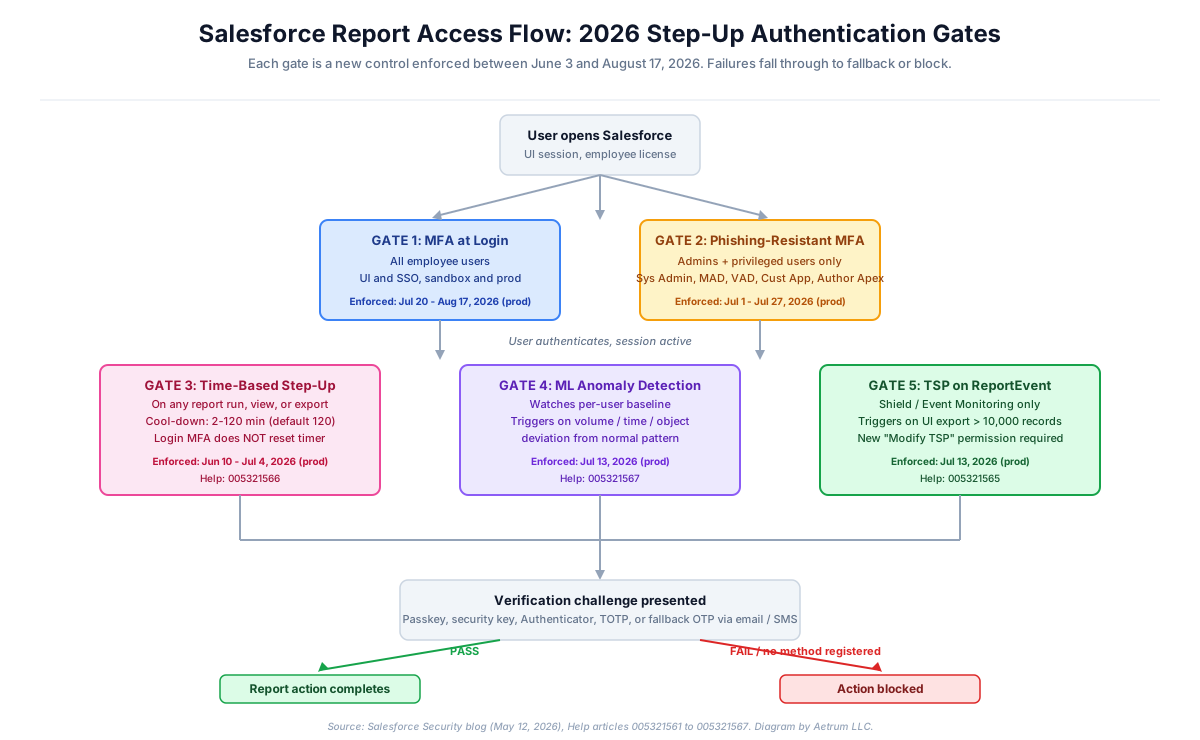
Each gate is a distinct enforcement event. MFA passing at login does not satisfy the time-based step-up cool-down; that timer runs independently. ML anomaly detection runs in parallel with the cool-down. The TSP gate fires only when the export size exceeds 10,000 records and only for Shield/Event Monitoring customers.
Control-by-control: the architect's view
1. Step-Up Authentication on Report Actions
What changes. Every user who runs, views, or exports a report through the UI is challenged for an additional verification step, even if they authenticated with MFA earlier in the same session. The default cool-down window is 120 minutes, configurable from 2 to 120 minutes via the new "Require step-up authentication within cool-down period" session-level policy. Logging in with MFA does not reset the timer, so the first report touch after the window expires triggers a fresh challenge. The control applies to UI only, not API.
Methods accepted. Passkeys, security keys, Salesforce Authenticator, and third-party TOTP apps qualify. Email OTP and SMS OTP exist only as fallback paths for SSO users who have not registered a Salesforce MFA method. If a user has no MFA method and no email or phone on file, the report action is blocked outright.
Why it matters. Report-based data exfiltration is the most common exit path in Salesforce breach forensics. Compromise a session, run a few reports, leave with the customer list. The session itself was legitimately authenticated, so login-time MFA does nothing to stop it. Step-up authentication re-binds the high-sensitivity action to the human at the moment of access.
Architect's perspective. This is the change that will generate the most help-desk volume in week one. Audit your user base for the three registration items needed: a Salesforce MFA method, a current email address on the User record, and a mobile phone number for SMS fallback. The User Login Report and the Identity Verification Methods report in Setup will surface gaps. The default 120-minute cool-down is reasonable for desk-based knowledge workers and painful for field users who switch devices throughout the day. Tune it before enforcement, not after the tickets start arriving.
Specific tips:
- Inventory embedded report components on Lightning home pages and Experience Cloud sites. The first time a user opens those pages after the cool-down expires, the challenge fires. Without warning, this will look broken.
- The control appears to apply equally to internal and external users, based on the wording in Salesforce's announcement; Salesforce Ben notes the exact treatment of external users is implied rather than explicitly confirmed.
- Salesforce has not yet clarified how step-up applies to dashboards or report charts. Test both in sandbox the day they become available (May 27, 2026).
- For printer-free or shared-device environments (call-center floors, manufacturing), email-based fallback may be the only viable path, which means each user needs their own email on file, not a shared inbox.
Salesforce Help: Prepare for the upcoming Step-up Authentication requirements on Report Actions (005321566) | Session-Level Policies
2. Step-Up Authentication on Anomalous Report Behavior
What changes. A machine-learning model watches per-user report-access patterns. Salesforce has not publicly enumerated the features the model uses; the kinds of signals such models typically incorporate are volume of reports run, time of day, object types accessed, and export size. When current behavior deviates significantly from the user's baseline, the next sensitive action triggers a step-up challenge, even if the user already passed the time-based cool-down challenge recently.
Why it matters. This is platform-level adaptive authentication, the same pattern AWS GuardDuty and Microsoft Entra ID Protection have used for years. It catches the case where a user has passed step-up authentication for routine work and is now doing something abnormal: pulling 50 reports in 10 minutes, exporting at 2 a.m. local time, or querying objects they have never touched.
Architect's perspective. The baseline period is not publicly documented. Expect false positives in the first 30 to 60 days after enforcement, particularly around new hires, role changes, fiscal-quarter close, and regulatory pull cycles. The model is per-user, not per-role, so a user who legitimately becomes a power reporter will be challenged until their new pattern stabilizes.
Specific tips:
- Do not promote users into report-heavy roles in the two weeks bracketing your production enforcement date. The behavior change reads as anomalous.
- For users with mandatory regulatory pull cycles (FINRA, HIPAA audit extracts, federal contract reporting), document the expected pattern internally so help desk does not waste cycles diagnosing a model that is functioning correctly.
- Require every user to have at least one verification method registered. With no method, anomalous behavior triggers an immediate block.
Salesforce Help: Prepare for Step-up Authentication in Anomalous Report Export (005321567)
3. Transaction Security Policy enhancements (Shield and Event Monitoring only)
What changes. Two coupled changes for customers licensed for Salesforce Shield or Event Monitoring.
First, if your org does not already have a Transaction Security Policy on ReportEvent, Salesforce will create one and enable it by default. The default policy triggers step-up authentication when a UI report export exceeds 10,000 records.
Second, a new permission called "Modify Transaction Security Policy" (referred to in some Salesforce communications as "Manage Transaction Security Policy") is required, in addition to the existing "Customize Application" permission, to create, update, delete, enable, or disable any TSP. Users holding only "Customize Application" are downgraded to read-only on TSPs after enforcement.
Why it matters. Two things at once. The 10,000-record line is the threshold Salesforce has calibrated between routine reporting and bulk extraction. The permission split delivers a genuine separation-of-duties improvement: today, anyone with "Customize Application" can disable a TSP. After enforcement, you can give app-builder access without handing over the keys to your security policy engine.
Architect's perspective. Two specific traps.
The first trap: the auto-created default TSP may conflict with TSPs you already have. Review Setup > Transaction Security Policies before enforcement and decide whether you want the default or your own. You almost always want your own, because the default has no exclusions for legitimate bulk-export workflows: Tableau CRM extracts, scheduled CSV exports to SFTP, integration users pulling reports through the Reports REST API. Without exclusions, those jobs start failing the morning enforcement lands.
The second trap: the new permission must be granted to your security operators before enforcement, or your security team loses the ability to manage TSPs the morning the change goes live. This is the kind of thing that turns into a Sev-1 if missed.
Specific tips:
- Inventory every user account with "Customize Application" today. That set is a superset of who should hold "Modify Transaction Security Policy." Trim accordingly.
- Document every legitimate bulk-export job: the user, the volume, the cadence. Your TSP needs exclusions for these or they break.
- If you do not have Shield or Event Monitoring, none of this applies to you directly. But the absence of a TSP on
ReportEventshould make you uncomfortable if you carry material customer data. This is a reasonable trigger to revisit the Shield licensing math.
Salesforce Help: Prepare for Transaction Security Policy Enhancements (005321565) | ReportEvent Policies
4. Phishing-Resistant MFA for Admins and Privileged Users
What changes. Users holding any of the following must enroll in phishing-resistant MFA: the System Administrator profile, Modify All Data, View All Data, Customize Application, or Author Apex permissions. Phishing-resistant methods are cryptographically bound to the Salesforce origin, which defeats adversary-in-the-middle phishing kits that proxy real login flows.
Qualifying methods:
- Built-in authenticators: Touch ID, Face ID, Windows Hello
- Physical security keys: YubiKey, Google Titan, any U2F or WebAuthn key
- Passkeys (when used with
Allow passwordless login with passkeys)
Methods that do NOT qualify:
- Salesforce Authenticator mobile app push approval
- Google Authenticator, Microsoft Authenticator, or any other TOTP app
- Email or SMS one-time codes
Why it matters. Standard push and TOTP MFA can be defeated by real-time phishing proxies. Phishing-resistant methods cannot, because the cryptographic challenge is bound to the legitimate Salesforce domain. This is the control that would have prevented several recent named breaches.
Architect's perspective. The permission scope is broader than people realize on first read. "Customize Application" is held by a lot of senior admins, release managers, and senior developers in most orgs. "Author Apex" is held by every active developer. Run the inventory now.
Specific tips:
- Plan for at least two registered phishing-resistant methods per privileged user. Hardware keys cost roughly $25 to $50 each. Lose one and you do not want to be locked out.
- Enable the relevant methods in Setup > Identity Verification:
Let users verify their identity with a built-in authenticator such as Touch ID or Windows HelloandLet users verify their identity with a physical security key (U2F or WebAuthn). Enabling the methods does not enforce enrollment; users still have to register. - Mobile SDK lockout risk. Mobile SDK 13.2.0 and earlier does not support phishing-resistant MFA. Admins using the Salesforce mobile app or any custom MSDK app on those versions will be locked out unless your org pre-configures advanced authentication in My Domain, or until they switch to the new "Login for Admins" browser-based flow shipping in Mobile SDK 13.2.1. Confirm your mobile app version before enforcement.
- If you use SSO, your identity provider must pass the right AMR/ACR signals indicating phishing-resistant authentication. For OIDC, verify in Login History. For SAML, use the SAML Validator tool. If the signal is missing, Salesforce will continue to prompt for additional MFA on every login.
- API-only users are exempt. Confirm your integration users carry the API-only permission so they do not get caught in the enforcement.
Salesforce Help: Prepare for Phishing-Resistant MFA Enforcement (005321563) | Enable Built-In Authenticators | Enable Security Keys
5. MFA for All Employee License Users
What changes. MFA is required for every employee license user logging in through the UI or through SSO, in both sandbox and production. The enforcement is implemented via locked settings, which means admins cannot disable it after the change lands. MFA has been contractually required since 2022; this is the end of the grace period.
Exempt by design:
- Experience Cloud and external community users
- API-only users (the API-only permission must be assigned)
- Free scratch orgs (enforcement applies to paid sandbox orgs)
Why it matters. Login-time MFA is the single most impactful control against account takeover. Salesforce's data shows it blocks the overwhelming majority of credential-theft attacks regardless of how good the stolen password was.
Architect's perspective. The big change here is not the requirement, which has existed since 2022, but the locked-down enforcement and the elimination of the legacy exemption permission.
The "Waive Multi-Factor Authentication for Exempt Users" permission is being effectively retired. After enforcement, that permission no longer waives MFA automatically; users with it are prompted to enroll. Exemptions for automation or test users now require a formal request to Salesforce Support. If you have legacy exempt users, get the support case opened now, not in July.
Specific tips:
- One-time passwords delivered via email, SMS, or phone call do not satisfy the MFA requirement. This applies whether you use Salesforce native MFA or an SSO provider. If your SSO uses SMS as second factor today, that is non-compliant.
- For SSO orgs, MFA must be enforced at the identity provider level. Okta, Entra ID, Ping, ADFS all support this. The provider must pass AMR/ACR signals back to Salesforce.
- Trial orgs converted to paid subscription no longer get the 30-day MFA grace period. If you onboard customers via trial-to-paid, factor this into your handoff process.
- Device Activation and MFA interact: completing MFA exempts the user from device activation prompts.
Salesforce Help: Prepare for MFA Enforcement for All Employee Users (005321561) | Multi-Factor Authentication for Salesforce Orgs
6. IP Address Restrictions (no longer mandatory, still recommended)
What changed (and what did not). Salesforce originally announced IP-range enforcement as part of this wave. They have since walked it back. IP address restrictions in profiles and the "Enforce login IP ranges on every request" session setting are no longer being enforced. Salesforce continues to strongly recommend them and may require them in a future wave.
Architect's perspective. Treat this as "you got a grace period; use it." The control is genuinely valuable, particularly if your org has not yet rolled out phishing-resistant MFA to all users. By default, IP checks only apply at login; users are not logged out mid-session if their IP changes. Enabling "Enforce login IP ranges on every request" closes that gap.
Specific tips:
- Inventory all legitimate IP ranges: offices, VPN endpoints, approved remote-work egress IPs, integration source IPs.
- Remote-heavy workforces will need VPN, ZTNA, or named-egress IPs for compliant connectivity.
- For regulated industries, the auditors increasingly expect this control regardless of Salesforce's enforcement posture.
Salesforce Help: Restrict Login IP Addresses in Profiles
7. Already enforcing (worth knowing, not new)
Email domain verification. Since the Spring '26 patch 11 rollout (new domains from March 24, 2026), outbound emails from unverified domains fail to send. Manual sends through Email Composer show a blocking error. Apex, Flow, and Workflow alert emails are silently dropped with no bounce notification, which is the more dangerous failure mode because automations break invisibly. Verification requires either an active DKIM key or a verified entry in the authorized email domain list. Free consumer domains (gmail.com, outlook.com) and platforms like Marketing Cloud are not in scope.
Anonymizing proxy and high-risk IP blocking. Expanded April 24, 2026 to cover all connected app and API traffic from anonymizing VPNs, proxies, and high-risk IPs. Users are auto-contained with admin notifications. There is no allow-list override: even allow-listed IP addresses get contained if classified high-risk at connection time. Some AWS IP ranges have been false-positive flagged; Salesforce is working on it.
The Aetrum prep checklist
This is the order I would attack these in if I were running the change as a delivery program. Each item is sized to a working session for a single admin or architect.
Now (between today and end of May 2026)
- Run an MFA Requirement Check across all employee users. Salesforce Labs offers a free
Multi-Factor Authentication Dashboardpackage; install it and customize the reports to surface who is not enrolled rather than who is. - Inventory privileged users: System Administrator profile, plus holders of Modify All Data, View All Data, Customize Application, Author Apex. Cross-reference this list with the hardware-key procurement decision.
- Procure at least two phishing-resistant methods per privileged user. Hardware keys at roughly $25 to $50 each, or built-in authenticators where the device supports them.
- Verify every user has a current email address and mobile phone number on the User record. Build a Login Flow to prompt for missing data on next login if needed.
- Audit all email-sending domains: confirm DKIM or authorized-domain-list entries are in place. Test Apex and Flow-triggered email paths specifically.
- If on Shield or Event Monitoring, document every legitimate bulk-export job and the user that runs it.
Late May 2026 (when features become available in sandbox)
- Enable built-in authenticators and security keys in Setup > Identity Verification in your full-copy or partial-copy sandbox.
- Test step-up authentication on Report Actions in sandbox starting May 27, 2026. Specifically test embedded report components on Lightning home pages and Experience Cloud sites.
- Configure the step-up cool-down to the value that fits your operational pattern (2 to 120 minutes), not the 120-minute default.
- For Shield customers: create your custom TSP on
ReportEventwith documented exclusions before June 1, 2026. Do not let the default get auto-installed. - Grant "Modify Transaction Security Policy" to designated security operators. Audit and trim "Customize Application" holders.
Early June 2026 (during sandbox enforcement)
- Validate that SSO providers pass AMR/ACR signals correctly. Check Login History for OIDC; use SAML Validator tool for SAML.
- Confirm Salesforce Mobile SDK version 13.2.1 or later is deployed for any admins who use the mobile app or custom mobile apps.
- Stage your end-user communications. Three touches typically: heads-up (T minus 30 days), enrollment instructions (T minus 14 days), enforcement-day reminder.
- Build a help-desk runbook for the first two weeks of production enforcement. Step-up false positives, missing methods, lost hardware keys, SSO signal failures.
Through July and August 2026 (production enforcement)
- Track Salesforce status page entries for your specific instance to confirm your stagger date.
- Monitor
LoginHistoryandEventLogFile(Event Monitoring) for failed authentication patterns in week one. - Open Salesforce Support cases proactively for any legitimate exemption needs (automation users, testing accounts) before enforcement, not after.
A word on the regulated-industry angle
For Aetrum clients in federal contracting, financial services, and healthcare, three observations:
The June through August enforcement windows overlap with most US-government fiscal-year-end deliverables and most financial-services half-year reporting cycles. If your delivery calendar already includes user-acceptance testing or production cutovers in that window, factor in a 1 to 2 week buffer for security-related help-desk volume.
Auditors are converging on this set of controls regardless of Salesforce's enforcement schedule. The fact that Salesforce is now enforcing them by default makes the audit conversation easier, not harder. Document the configurations, the rollout dates, and the user-comms plan; that documentation becomes evidence.
For federal-contractor orgs subject to CMMC, the phishing-resistant MFA requirement maps directly to MFA controls in NIST 800-171 / 800-172. Salesforce announced CMMC Level 2 certification on the platform side; the configuration responsibility is still yours under the shared responsibility model.
What Aetrum is watching next
Salesforce has signaled that this is not the final wave. Expect:
- A future wave that re-introduces IP-range enforcement, likely tied to phishing-resistant MFA adoption metrics across the customer base.
- Clarification on how step-up authentication applies to dashboards, embedded analytics, and report charts.
- Tightening of the Mobile SDK floor as phishing-resistant methods stabilize across mobile use cases.
- More aggressive treatment of legacy authentication methods (TOTP, push approval) for non-privileged users.
If you would like a current map of how these controls apply to your specific org, Aetrum runs a fixed-fee Org Access Assessment that inventories every certificate, integration, and connected app in your org and flags what fails under the 2026 controls. You can also get in touch directly.
Primary sources
- Strengthening Salesforce Security Against AI-Driven Threats (Salesforce Security team, May 12, 2026)
- Security-Related Product Updates to the Salesforce Platform (005317465)
- Prepare for MFA Enforcement for All Employee Users (005321561)
- Prepare for Phishing-Resistant MFA Enforcement (005321563)
- Prepare for Transaction Security Policy Enhancements (005321565)
- Prepare for Step-up Authentication Requirements on Report Actions (005321566)
- Prepare for Step-up Authentication in Anomalous Report Export (005321567)
- Restrict Login IP Addresses in Profiles
- Salesforce Ben: Security Roadmap 2026 (Tom Bassett, May 8, 2026)
- Salesforce Break: How Salesforce Will Secure Your Org Against Hackers (Andy Engin Utkan, May 6, 2026)
- Platform Security Enhancements Webinar registration
Aetrum LLC is a Salesforce consulting practice serving federal contractors, financial services, and healthcare. Reach us at aetrumllc.com.